Wireless earbuds with charging case: what to check
Check wireless earbuds and case charging separately. Learn which model details to confirm before choosing a case for your charging station.
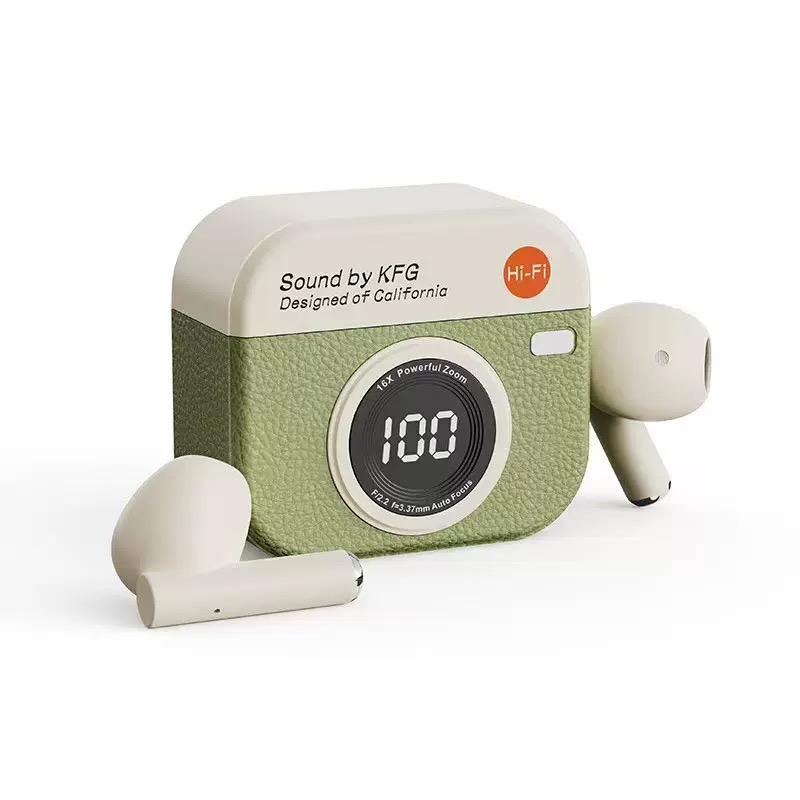
Choosing wireless earbuds with a charging case? Start with two questions: how do the earbuds recharge, and how does the case receive power? Find the instructions for the exact model, then compare its documented charging method with the charger or mat you want to use. A camera-inspired shape or the word "wireless" cannot answer that compatibility question.
The examples here come from Apple's instructions and a merchant's product catalog. No hands-on testing is claimed, and the article does not recommend a tested case-and-charger combination.
Earbud charging and case charging are different questions
Apple's AirPods charging guide tells users to put AirPods in their case to charge them. Apple's guide separately describes wireless case charging for the MagSafe Charging Case and Wireless Charging Case.
Keep those two steps separate when reading instructions. "How do I recharge the earbuds?" concerns the earbuds inside the case. "Can I put the case on my charging mat?" asks how to supply power to the case. Finding the first answer does not settle the second.
Use Apple's guidance for the Apple products it names. For another model, check its own instructions before deciding how to charge it.
What do you mean by a charging dock?
Write down the setup you want to use. If you have a mat in mind, name it; for a cable connection, identify the charger. Give the seller a specific combination to check.
In one r/Earbuds exchange, a respondent asked whether a shopper's request for a charging dock meant wireless charging. The original poster replied, "I mean qi charger!" That reply clarifies this shopper's preference. It does not verify the suggested products or show how common the preference is.
You could ask: "Does this exact case support my charger model, and which instructions confirm that?" If you mean a Qi charging mat, say so. Request the case model and its documentation so you can check the answer yourself.
Read the case description without adding a specification
Product catalog image. Use the photograph to consider the styling, not to establish charger compatibility.
The product catalog describes Camera Case Wireless Earbuds as "wireless earbuds with a camera-inspired charging case."
The camera-inspired wording tells you about styling. To assess Camera Case Wireless Earbuds for a charging station, ask for that model's charging instructions and look for information about your intended charger. Its charging method remains unconfirmed here.
Apply the same distinction to other listings. A description of the case's appearance may leave the charging question unanswered. Keep compatibility unresolved in that situation: missing information establishes neither support nor lack of support.
Build a case-and-charger check
Put the case instructions and charger instructions side by side. Use this checklist to record what each says:
| Check | What to write down | | --- | --- | | Earbuds and case | The exact model names | | Intended charger | The charger or mat model you plan to use | | Charging method | The case instructions' statement about the supported method | | Conditions | Any requirements attached to that statement | | Unresolved point | The specific question to send the manufacturer or seller |
For an example of explicit wording, Apple's guide names the MagSafe Charging Case and Wireless Charging Case when explaining charging on a Qi-certified mat. Look for equally specific documentation for your own choice. Apple's statement applies to the named Apple cases, so it cannot confirm compatibility for another case.
If the instructions leave a point unclear, send that question to the manufacturer or seller before choosing earbuds for your charging setup. Once you have a compatibility answer, you can consider color and styling separately.
Charging-station FAQ
How can I check whether an earbud case works with my charging station?
Identify both models, then compare the charging methods and conditions in their instructions. If the match is unclear, ask the manufacturer or seller whether the exact combination is supported. Include both model names in your request, even when another case looks similar.